The Ultimate Guide to Audience Targeting in Google Ads
You have campaigns live, but you’re not sure which audience segment actually moves buyers while they’re still weighing options, or what affinity audiences really do. Google Ads audience targeting lets you reach people by who they are and what they care about rather than only the words they type, so the right choice depends on where someone sits in your funnel. Below you’ll find the two direct answers, a side-by-side comparison, and a simple way to layer segments by stage.
Quick Answer
Affinity audiences are the best Google Ads targeting option for influencing consideration, because they reach people with a proven, long-term interest in your category and are built to raise awareness and grow preference. In-market audiences take over lower in the funnel, targeting people who are actively researching or comparing products right before they buy.
- What they are: Prebuilt segments of users grouped by long-term interests, passions, lifestyles, and habits.
- When to use which: Affinity to create consideration among interest-based prospects; in-market to capture buyers already comparing options.
- How to apply them: Set targeting at the ad group or campaign level, and layer segments rather than relying on any single one.
What Is Google Ads Audience Targeting
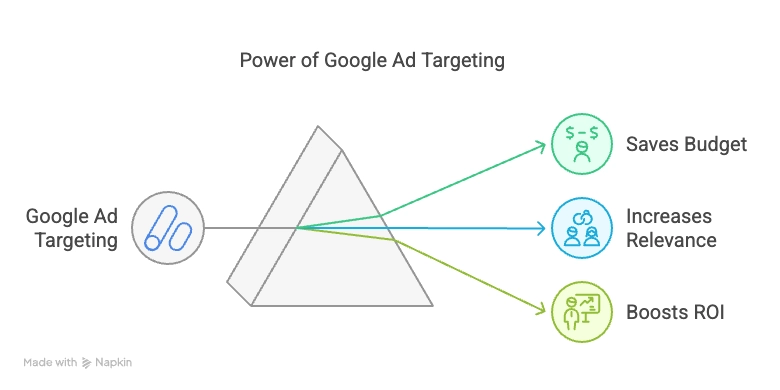
Google Ads audience targeting shows your ads to defined groups of people that Google identifies by their interests, habits, purchase intent, and past interactions with your business, rather than only by the keywords they search. You apply it at the ad group or campaign level, so the same segment can shape one ad group without touching the rest of your account.
The terminology has changed, which trips up anyone using an older guide. Per Google Ads Help, “audience types” (these include custom, in-market, and affinity) are now referred to as audience segments, and “remarketing” is now referred to as “your data.”
You also choose how a segment is applied. Targeting mode restricts who sees your ads to the segment you select. Observation mode leaves your reach unchanged and only collects performance data by segment. Start in observation so you can learn how each group behaves before you narrow anything.
What Are Affinity Audiences
Affinity audiences are predefined groups in Google Ads segmented by long-term interests, passions, lifestyles, and habits, built from browsing behavior, search patterns, and content consumption. These groups are built from extended engagement data, ensuring each user has shown a proven, qualified interest in the topic, which is exactly why they suit the consideration stage.
Common segments include:
- Health & Fitness Enthusiasts
- Technology Buffs
- Travel Enthusiasts
- Avid Investors
- Green Living Enthusiasts
They’re strongest for top-of-funnel awareness and for driving consideration among people who share your ideal customer’s interests, even when those people aren’t searching for you yet. If you used custom affinity audiences in the past, those inputs (keywords, URLs, and apps) now live inside the custom segments option, so don’t go looking for the old standalone tool.
For example, a fitness brand promoting a new workout app can target the “Health Enthusiasts” segment to reach a receptive crowd. Pair that reach with strong creative: use eye-catching visuals, engaging headlines, and clear messaging to leave a lasting impression. For a deeper walkthrough, see our guide to affinity audiences in Google Ads.
Which Targeting Option Is Best for Influencing Consideration
For influencing consideration, affinity audiences are the strongest choice when you want to reach new interest-based prospects, and in-market audiences are the better choice once buyers are actively comparing options. Affinity reaches broad interest groups to build familiarity and preference, while in-market signals near-term purchase intent, so the “best” option depends on whether you’re creating consideration or capturing it.
The practical middle ground is to layer. Use affinity for reach, add remarketing to re-engage warm visitors, and shift budget toward in-market and remarketing as prospects move down the funnel.
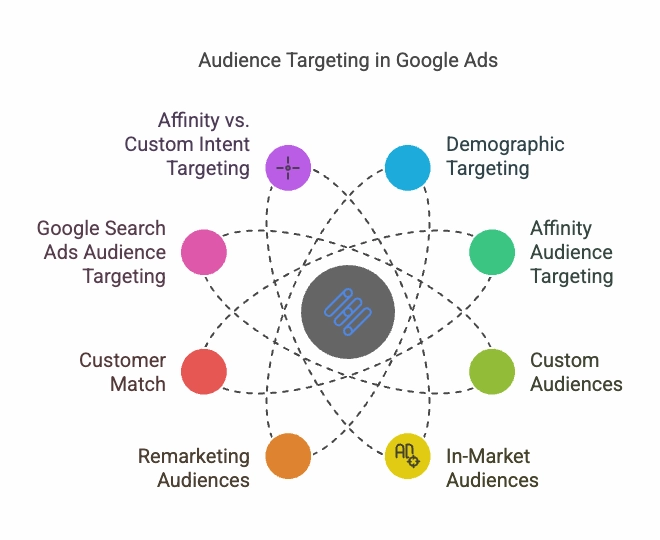
| Audience Type | What It Targets | Funnel Stage | Best For | Intent Level |
|---|---|---|---|---|
| Affinity Audiences | Long-term interests, passions, lifestyles | Awareness / Consideration | Building preference with new prospects | Low to medium |
| In-Market Audiences | Recent research and comparison activity | Active Consideration / Conversion | Reaching near-ready buyers | High |
| Detailed Demographics | Traits like parental status, education, homeownership | Awareness / Consideration | Refining who qualifies | Low |
| Custom Segments | Your chosen keywords, URLs, and apps | Consideration / Conversion | Tailored intent and interest targeting | Medium to high |
| Remarketing (Your Data) | People who visited your site or app | Consideration / Conversion | Re-engaging warm visitors | High |
| Customer Match | Your CRM list of existing customers | Conversion / Retention | Loyalty, upsell, and lookalike reach | Highest |
Read the table from top to bottom as a funnel: the higher rows create demand and the lower rows capture and keep it.
How to Match and Layer Audiences by Funnel Stage
Awareness and early consideration lean on affinity and detailed demographics to introduce your brand to the right kinds of people. Active consideration and conversion lean on in-market, custom segments, and remarketing, because in-market audiences are groups of people Google has identified as actively researching or comparing products and services. These users are further down the purchase funnel, meaning they’re closer to a buying decision. Retention runs on Customer Match and your data segments.
Two layering examples you can copy today:
- Pair an affinity segment of Avid Investors with investing keywords so broad interest is filtered by real search intent.
- Add a remarketing list of recent pricing-page visitors to your branded search campaigns to recapture warm demand.
Discipline is what keeps this from wasting spend. Start every new segment in observation mode, watch performance segment by segment, exclude the low performers, and reallocate budget based on real campaign data rather than assumptions. That testing-driven loop is how we run accounts at Velocity, and it consistently beats “set it and forget it.” When you’re ready to focus on capturing demand, our guide to in-market audiences covers the setup in detail.
The Bottom Line
Use affinity audiences to influence consideration and hand buyers off to in-market and remarketing as they get closer to purchasing. Map each active segment to a funnel stage this week, launch new ones in observation mode, and cut what underperforms before you scale. If you’d rather have a senior strategist audit that setup, Velocity offers a free strategy call and account audit to pressure-test your targeting.
FAQ
Affinity audiences are prebuilt Google Ads segments that group people by long-term interests, passions, and lifestyles, built from their browsing and content habits. They are designed for awareness and consideration. A meal-kit brand, for example, might target Cooking Enthusiasts to reach people who love food but are not yet searching for its product.
Affinity audiences are the best option for influencing consideration, because they reach interest-based prospects and build familiarity and preference before a purchase decision. Once buyers are actively comparing products, in-market audiences become the stronger choice for capturing that intent.
Affinity audiences target long-term interests and passions, which suits awareness and consideration. In-market audiences target recent purchase intent, which suits conversion. Google looks at browsing history, time spent on certain websites, and past purchases to identify patterns of interest over a broader period, while in-market targeting focuses more on recent history and what users are currently searching for.
You apply audience targeting at the ad group or campaign level through the Audience segments settings. This lets you attach different segments to different ad groups without changing the rest of your account.
Targeting mode restricts your ads so only the chosen segment can see them. Observation mode leaves your reach unchanged and simply collects performance data for that segment. Start in observation when you’re testing, then switch to targeting once a segment proves it converts.
Yes. Affinity segments are broad by nature, so pair them with qualified keywords to filter out irrelevant traffic. They tend to shine most on Display and YouTube, where awareness and consideration goals fit their strengths.
The old custom affinity tool was merged into custom segments. You now build the same kind of interest-based audience by entering relevant keywords, website URLs, and apps, giving you tighter control than the standard predefined lists.
Launch new segments in observation mode, monitor performance segment by segment, and exclude the low performers early. Then layer segments to match each funnel stage so awareness dollars, consideration dollars, and conversion dollars each go to the audiences built for that job.