10 Google Ad Copy Examples + How to Write Ads That Convert
Google Ads is one of the most effective ways to drive traffic and conversions, but results hinge on your ad copy. A well-crafted ad can capture attention, drive clicks, and convert searchers into paying customers.
In this post, we’ll break down 10 Google Ad copy examples and show you exactly what makes them work, so you can apply these principles to drive more conversions. Plus, we’ll break down why these ads work and how you can replicate their success.
Key Takeaways
- Search Intent: The most successful ads mirror the user’s search query directly in the headline.
- Benefit-First: Focus on solving the user’s problem (e.g., “Get Funded”) rather than just listing features.
- Social Proof: Use rankings, client counts, or awards to build immediate trust.
- Urgency & Specificity: Incorporate specific timelines (e.g., “72h”) or numbers to drive higher CTR.
- Frictionless CTAs: Use low-barrier calls to action like “Try for Free” or “Tour Today.”
Why does your Google Ads copy matter?
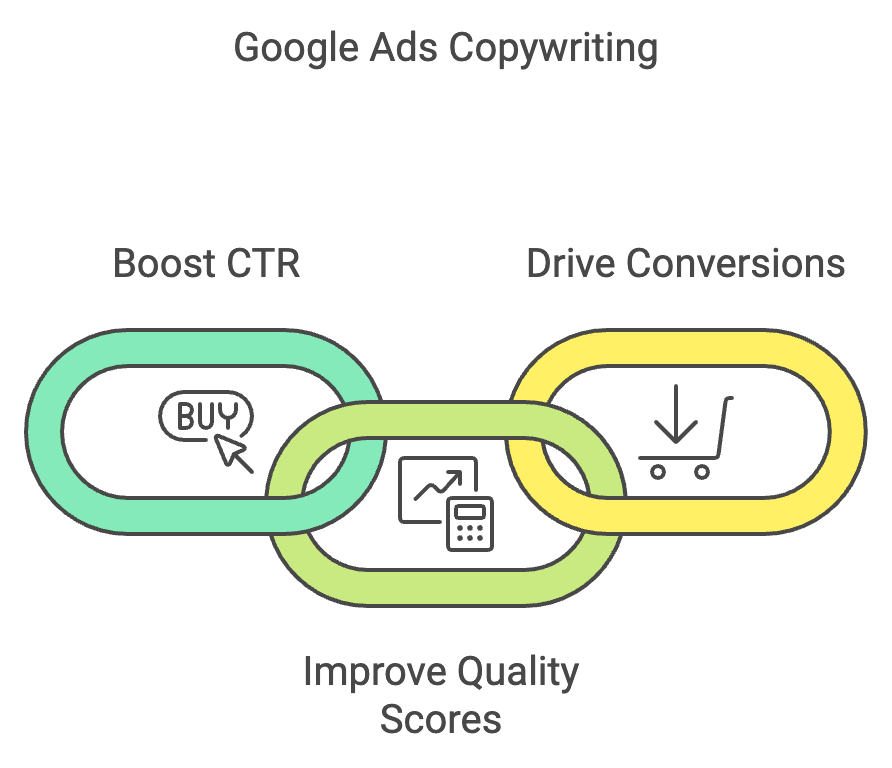
Why does Google Ads copy matter so much? Because your ad is often the first interaction between your brand and a potential customer. Great ad copywriting for Google Ads can:
- Boost Click-Through Rates (CTR): Relevant, compelling ads drive higher click-through rates (CTR).
- Increase Quality Scores: Relevant copy that matches search intent improves your Quality Score and ad position.
- Drive Conversions: Clear CTAs drive conversions by telling users exactly what to do next.
Here’s what we’ve learned from managing hundreds of Google Ads campaigns: generic copy doesn’t work. The difference comes from analyzing what works, testing relentlessly, and doubling down on copy that actually drives clicks and conversions.
What makes a Google ad effective?
Effective Google Ads share a few common traits:
- Relevance: The ad aligns with the search intent.
- Clarity: The message is easy to understand.
- Value Proposition: The ad communicates a unique benefit.
- Call to Action (CTA): The user knows what to do next.
- Message Match
- Conversion-Ready Landing Page
Below, we’ll break down 10 Google Ad examples and explain exactly why they work, and how you can apply these tactics to your campaigns.

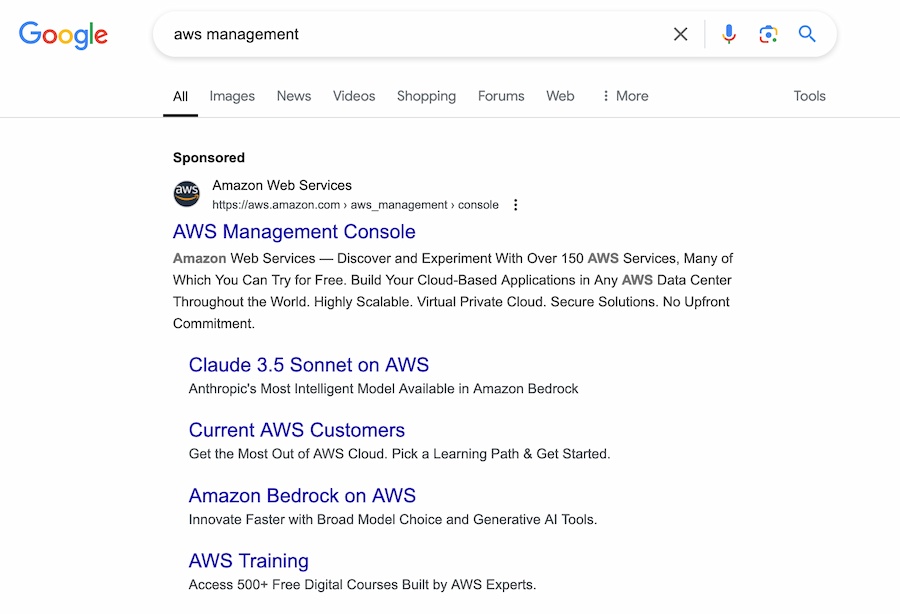
1. Amazon Web Services – power in simplicity
Why it works
- Headline Clarity: “AWS Management Console” directly matches the search query, improving relevance and Quality Score.
- Value Proposition: The ad emphasizes features like scalability, secure solutions, and worldwide accessibility, addressing key concerns for developers and businesses alike.
- Actionable CTA: Encourages users to “Discover and Experiment” with AWS services, inviting exploration while highlighting that many tools are free to try.
Takeaway
Make sure you match your headline to the search intent while emphasizing key benefits. Ensure your copy speaks directly to the needs of your audience and highlights why your solution stands out.
2. Booking.com

Why it works
- Headline Appeal: “Cheap Hotel Rooms” targets price-sensitive travelers and immediately appeals to their need for affordability.
- Trust Signals: Phrases like “perfect stay” and “real guest reviews” reduce friction and increase click-through rates by addressing common objections upfront.
- Sitelinks: The sitelinks, such as “Book for Tonight” and “Hotels at Great Prices,” provide users with immediate options, improving navigation and enhancing user experience.
Takeaway
Use sitelinks to give users clear next-step options and include social proof (reviews, ratings) to reduce friction and improve conversion rates. Using testimonials and guest reviews adds credibility and encourages clicks.
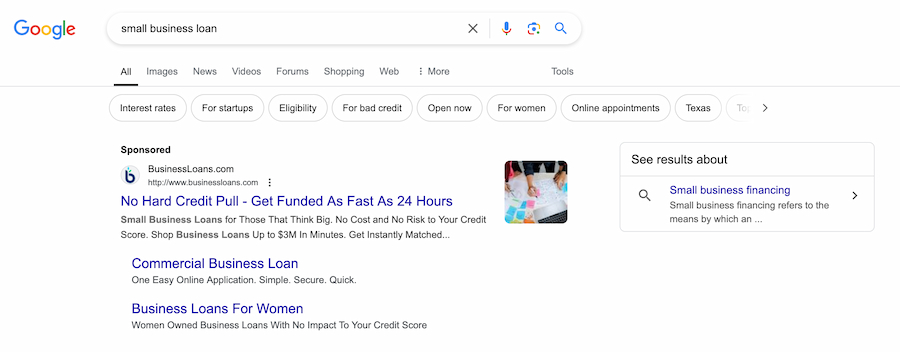
3. BusinessLoans.com
Why it works
- Urgency: “Get Funded As Fast As 24 Hours” creates a sense of immediacy, attracting users who need quick solutions.
- Specific Audience: The ad speaks directly to small business owners, offering a tailored solution with language like “No Hard Credit Pull.”
- CTA Focus: The ad directs users to apply immediately with phrases like “Get Instantly Matched,” which adds a sense of ease and speed.
Takeaway
Test urgency language (limited-time offers, fast turnaround times) to increase conversion rates among high-intent searchers. Speak directly to your audience’s needs and emphasize a hassle-free process.
4. Healthy Hound Playground
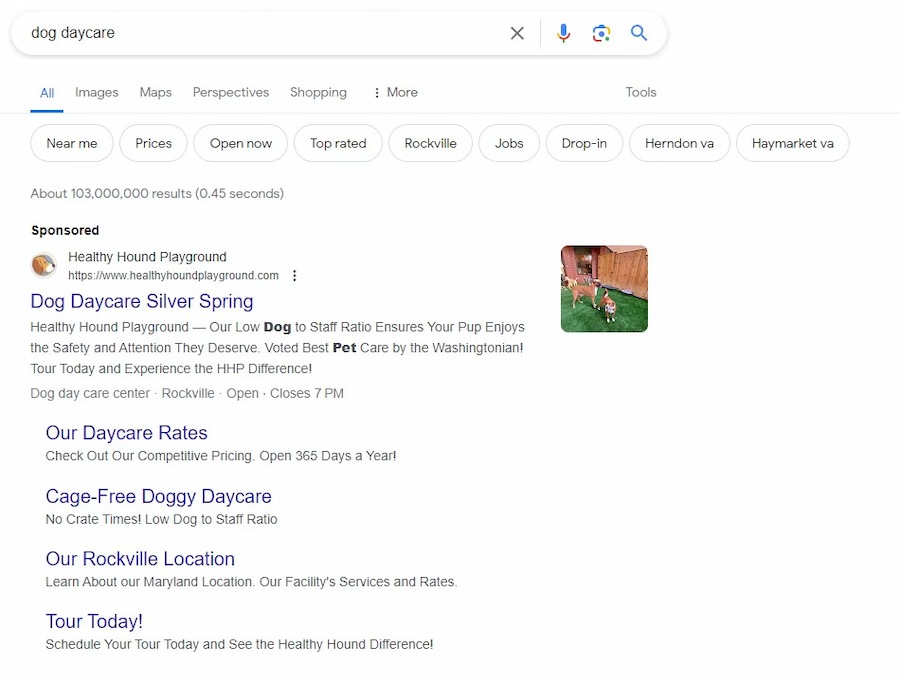
Why it works
- Personalized Appeal: “Low Dog to Staff Ratio” directly addresses pet owners’ concerns for safety and individual attention, making the ad feel tailored and reassuring.
- Trust Signal: The mention of “Voted Best Pet Care” adds credibility and sets the business apart from competitors.
- Engaging CTAs: “Tour Today!” creates a sense of urgency and gives potential customers a clear next step to engage with the business.
Takeaway
Match your ad copy to specific search intent and address the exact problem your target customer is trying to solve. Use trust signals and actionable CTAs to build confidence and encourage user engagement.
5. HubSpot
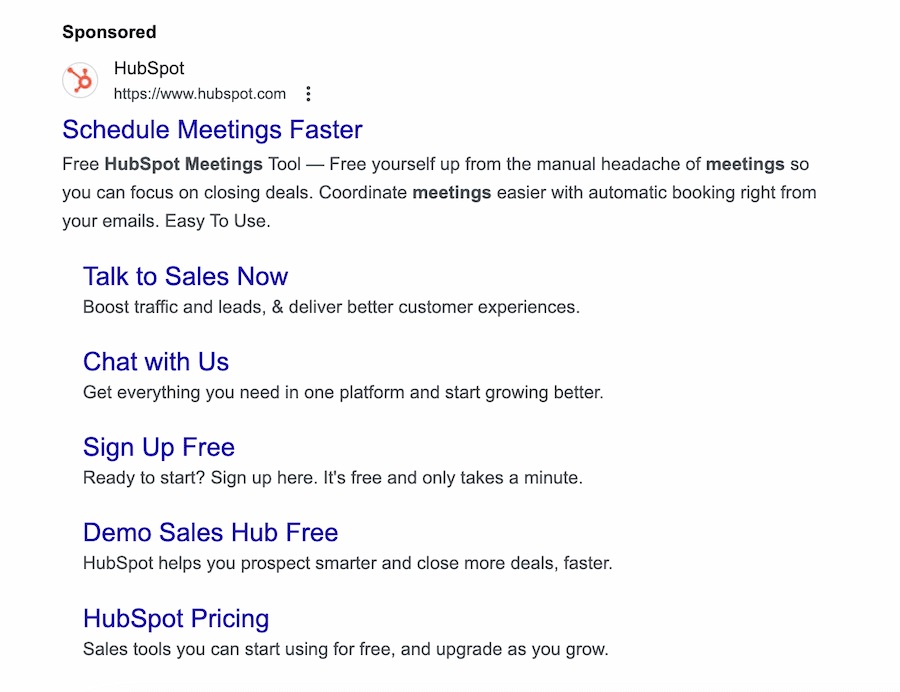
Why it works
- Free Offer: “Free HubSpot Meetings Tool” eliminates financial risk for users and encourages them to try the service without hesitation.
- Efficiency Focus: Highlights time-saving benefits like “Easy To Use” and “Coordinate meetings easier,” appealing to busy professionals looking for simplicity.
- Clear CTAs: Offers multiple CTAs like “Sign Up Free” and “Demo Sales Hub” to cater to different stages of the buyer’s journey.
Takeaway
Lead with free trials or freemium offers to reduce friction, and emphasize time savings to appeal to busy decision-makers. Multiple CTAs can help guide users to take action based on their current needs.
6. Indeed
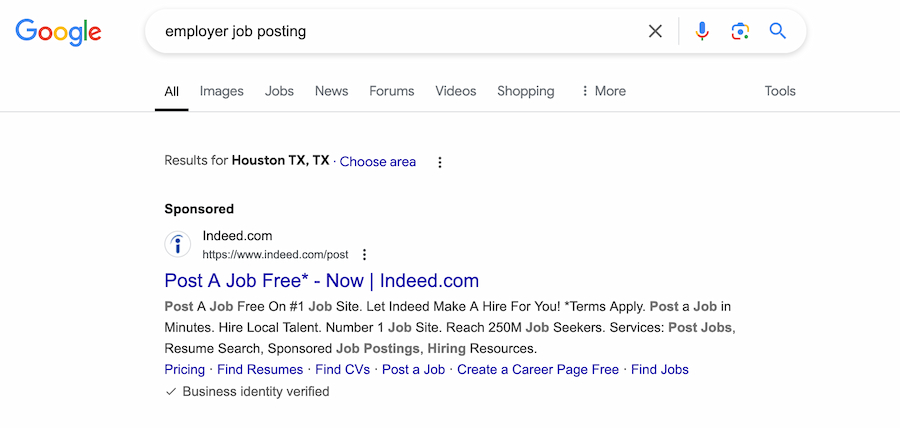
- Simplified Process: “Post a Job in Minutes” appeals to busy employers who need quick, hassle-free solutions.
- Social Proof: Positioning itself as the “#1 Job Site” lends authority and builds trust.
- Targeted Features: The ad speaks directly to employers with tools like “Resume Search” and “Sponsored Job Postings,” which align with their hiring goals.
Takeaway
Include specific social proof (rankings, customer counts, awards) and simplify your process messaging to improve CTR and conversion rates. Make your process as easy and seamless as possible.
7. NerdWallet
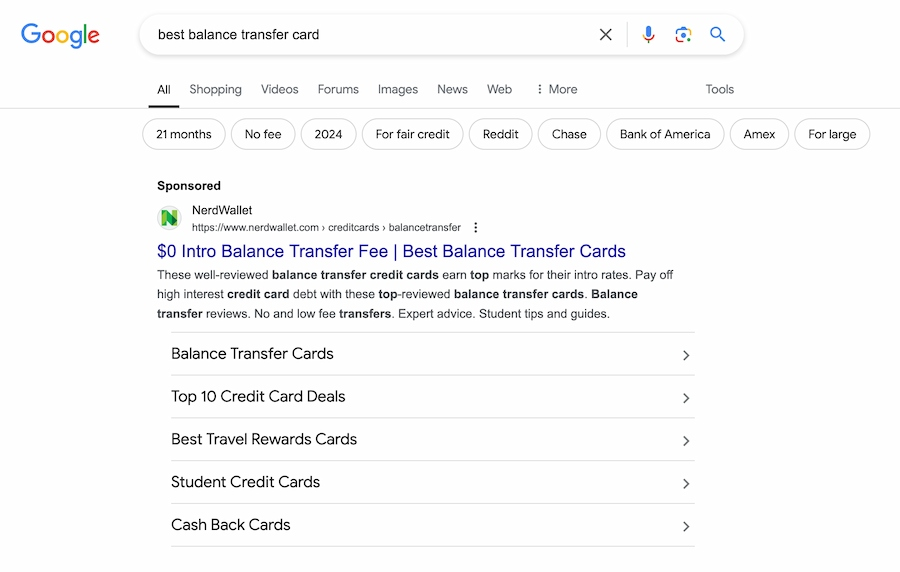
Why it works
- Headline Relevance: The headline, “Best Balance Transfer Cards,” directly matches the search query, improving the ad’s relevance and Quality Score.
- Benefit-Driven Copy: The description focuses on pain points like “Pay off high-interest credit card debt,” making the value immediately clear to users.
- Sitelinks: The additional links provide specific categories, like “Student Credit Cards,” offering users more personalized options.
Takeaway
Focus on outcomes (save money, reduce debt, get approved faster) rather than features, and use sitelinks to segment by audience or use case.
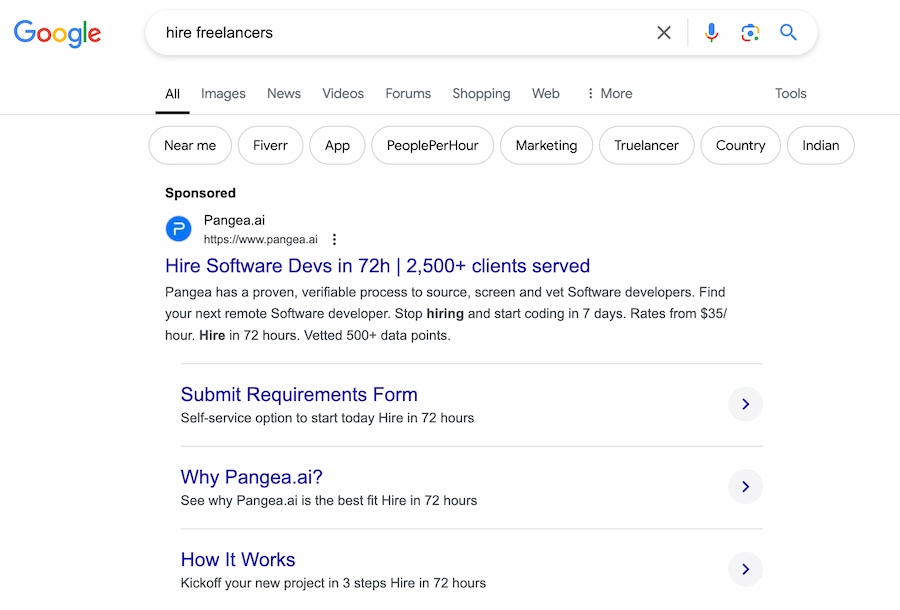
8. Pangea.ai
Why it works
- Speed Promise: “Hire Software Devs in 72h” highlights a quick turnaround time, appealing to businesses with urgent project needs.
- Credibility: References “2,500+ clients served” and a vetted process, building trust and establishing authority in the market.
- Sitelinks: Offers actionable options like “Submit Requirements Form” and “How It Works,” simplifying the user journey.
Takeaway
Lead with turnaround time (72 hours, same-day service) and include credibility markers (clients served, vetted process) to reduce hesitation and drive conversions. Provide clear next steps to guide users effectively.
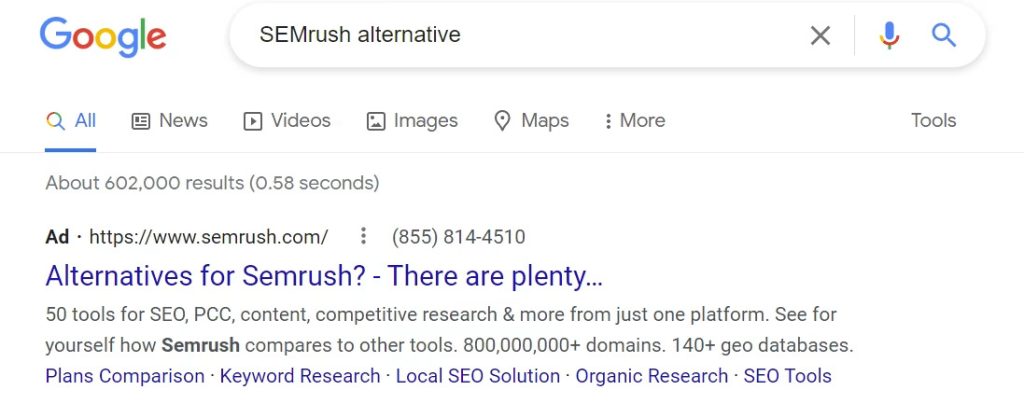
9. SEMrush
Why It Works:
- Comparison Angle: The ad appeals to users searching for alternatives by directly addressing their needs with “There are plenty.”
- Broad Appeal: The copy lists a variety of features, such as “50 tools for SEO, PPC, content,” appealing to users with diverse needs.
- Call to Action: Encourages users to explore SEMrush’s offering with “See for Yourself,” creating curiosity.
Takeaway
In competitive searches, position yourself as an alternative to the market leader to capture comparison shoppers and improve CTR. Focus on the breadth of features and encourage users to explore further.
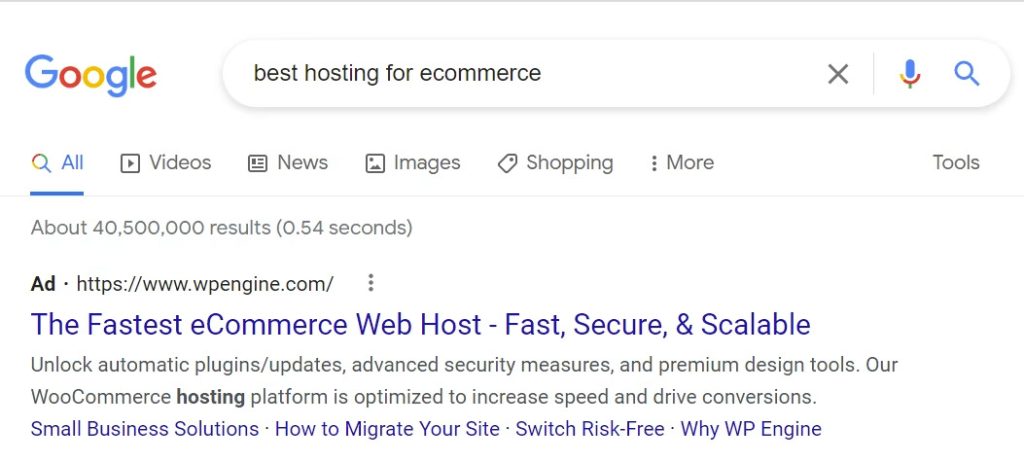
10. WP Engine
Why it works
- Performance Focus: Words like “Fast, Secure, & Scalable” resonate with eCommerce businesses seeking high-performance hosting.
- Trust Signals: Mentions premium features like “automatic plugins/updates,” which convey reliability and ease of use.
- Targeted Audience: The ad is clearly aimed at eCommerce businesses, aligning the copy with their specific needs.
Takeaway
Segment campaigns by audience (eCommerce vs. SaaS, small business vs. enterprise) and tailor messaging to their specific requirements and pain points. Use performance-driven language to appeal to business priorities.
| Brand | Core Strategy | Key Benefit |
|---|---|---|
| AWS | Simplicity | Scalability & Security |
| Booking.com | Emotional Triggers | Trust & Affordability |
| BusinessLoans.com | Urgency | Speed of Funding |
| HubSpot | Free Offers | Zero Financial Risk |
| Pangea.ai | Speed Promise | Vetted Authority |
How to create eye-catching Google Ads copy?
Eye-catching Google Ads copy matches search intent, communicates a specific benefit, and makes the next step obvious.
Apply these principles to your campaigns:
1. Write headlines that match search intent
Match your headlines to search queries to improve Quality Score, reduce CPC, and increase the likelihood that your ad resonates with high-intent searchers. Google headlines are limited to 30 characters, so front-load your primary keyword early. For example, if they’re searching for “best hosting for eCommerce,” your ad should include that exact phrase.
2. Focus on benefits over features
Focus on outcomes (save time, reduce costs, increase revenue) rather than product features. This speaks directly to what buyers care about and improves conversion rates.
3. Use numbers and specifics
Use specific numbers (‘Save 30%,’ ’24-hour funding,’ ‘500+ clients’) to add credibility and make your offer concrete – vague claims don’t convert.
4. Incorporate emotional triggers
Address specific pain points (high costs, slow processes, poor results) and position your solution as the fix, this reduces friction and improves conversion rates.
5. Leverage CTAs
Match your CTA to the funnel stage: use ‘Get a Quote’ or ‘Start Free Trial’ for high-intent searches, and ‘Learn More’ or ‘See How It Works’ for discovery-phase queries.
Conclusion – turn inspiration into action
High-performing Google Ads copy comes from rigorous testing, clear messaging that matches search intent, and continuous iteration based on conversion data. Apply these principles to your campaigns. Test different headlines, CTAs, and value props, then double down on what drives the best CTR and conversion rates.
Ready to create ads that convert? Start experimenting with these tips today, or get in touch and we’ll help you write ad copy that drives real ROI.
FAQs
How many characters can I use in Google Ads headlines and descriptions?
For standard Google Search Ads, you typically have:
- Headlines: Up to 3 headlines, 30 characters each
- Descriptions: Up to 2 descriptions, 90 characters each
Because space is tight, lead with the keyword and the core benefit in Headline 1.
How do I measure whether my ad copy is working?
Track copy performance with metrics that connect clicks to outcomes:
- CTR: Are your headlines and offers earning clicks?
- Quality Score: Are you improving relevance and lowering CPC?
- Conversion rate: Are clicks turning into leads or sales?
- Cost per conversion: Is performance improving at the same spend level?
- A/B testing: Compare variations of headlines, descriptions, and CTAs to see what lifts CTR and conversions.
How often should I test new Google Ads copy?
Review performance weekly, but give tests enough data to be meaningful. In most accounts, run A/B tests for 2–4 weeks (or until you have sufficient conversions) before deciding what to keep, pause, or iterate.
Where should I put my keywords in Google Ads copy?
Start by placing your primary keyword (or close variant) in Headline 1, then support it in Headline 2 or the description. Avoid keyword stuffing, prioritize clarity and message match to the landing page.
What are Google Ads extensions (assets), and do they matter?
Google Ads extensions (now called assets) are additional pieces of information you can add to your ads like sitelinks, callouts, and structured snippets.
- More visibility: Takes up more space on the results page.
- Higher CTR: Gives searchers more reasons (and ways) to click.
- Better intent match: Helps users self-select into the most relevant next step.